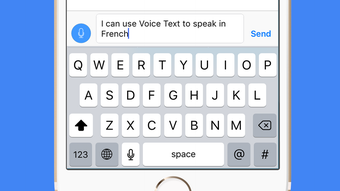

Speak to Text: No Keyboard Needed
Overview
Voice Text is a mobile productivity tool designed for iPhone users seeking a faster, more efficient way to compose messages without typing. The application leverages voice-to-text transcription to convert spoken words into written text in real time. It is particularly useful for individuals who need to send texts quickly while on the move, during multitasking, or when typing is impractical. The app enables users to send messages via SMS, email, or share transcriptions through the clipboard, making it ideal for professionals, students, and casual users alike. It also supports direct posting to social media platforms such as Twitter and Facebook, streamlining content creation and sharing.
Developed by Josip Valcic, Voice Text focuses on seamless integration into daily communication workflows. Its core purpose is to reduce reliance on physical keyboards, offering an alternative method for text input that emphasizes speed and convenience. The app is optimized for iPhone, ensuring compatibility with Apple’s ecosystem and native messaging services. While the developer did not provide additional details about the company or background, the app’s functionality suggests a targeted approach to enhancing user efficiency through speech recognition technology.
Real-world usage scenarios include sending quick replies while driving, drafting messages during meetings, or composing social media posts hands-free. The app’s reliance on internet connectivity means it functions best in environments with stable network access. Overall, Voice Text serves as a practical solution for users prioritizing speed and accessibility in digital communication.
Key Features & Capabilities
- Voice-to-Text Transcription: Users can speak naturally, and the app instantly converts speech into text using an intelligent speech recognition system. This feature eliminates the need for manual typing and supports rapid message creation.
- Multi-Platform Message Delivery: Transcribed text can be sent directly as SMS, composed into emails, pasted into any app via the clipboard, or shared on social networks like Twitter and Facebook.
- Smart Editing Tools: A suggested word list helps users correct transcription errors or refine their message with minimal effort, improving accuracy and workflow efficiency.
- Automatic Grammar Correction: The app applies real-time grammar adjustments to ensure messages are clear, professional, and error-free.
- Multi-Language Support: Voice Text supports a wide range of languages, including English (US, UK, Australia), Spanish (Spain, Mexico, US), Italian, German, Japanese, Chinese (Mandarin, Cantonese, Taiwanese), French (France, Canada), Polish, Portuguese (Portugal, Brazil), Russian, Dutch, Korean, Swedish, Norwegian, and Danish.
- Learning-Based Accuracy: The system improves over time by adapting to individual speech patterns, enhancing transcription precision with continued use.
These features collectively address common pain points in digital communication—slow typing, frequent errors, and the need for multitasking. For example, a user can dictate a message while walking, correct minor mistakes with suggested words, and send it via email without touching the keyboard. Similarly, a content creator can draft social media updates by speaking, apply grammar fixes, and post directly to Twitter, all within seconds. The app’s ability to adapt to diverse language preferences also makes it accessible to international users.
User Interface, Workflow & Performance
Voice Text features a clean, minimalist interface tailored for iPhone’s touch-based environment. The main screen centers around a large microphone icon, clearly indicating the primary function: start speaking. Navigation is straightforward, with intuitive gestures and minimal on-screen clutter. Users initiate transcription by tapping the microphone, and the app provides real-time visual feedback through a waveform or progress indicator.
The workflow is designed for speed and simplicity: speak → transcribe → edit (if needed) → send or paste. The editing interface displays suggested corrections in a list format, allowing quick selection and minimal disruption to the flow. This streamlined process supports high efficiency, especially in time-sensitive situations.
Performance observations are based on general software behavior patterns. The app relies on cloud-based speech recognition, meaning it requires a stable internet connection to function. The developer did not specify resource usage details, such as CPU or RAM consumption. However, given the app’s size of 35.5 MB and its focus on real-time processing, it is likely optimized for efficient background operation. Stability is expected to be consistent within Apple’s ecosystem, though performance may vary depending on network speed and device capabilities.
Compatibility & System Requirements
Voice Text is designed exclusively for iPhone devices. The app is compatible with the latest iOS versions, though specific version requirements were not listed by the developer. Installation size is 35.5 MB, which is relatively lightweight for a speech recognition application.
Exact system requirements were not listed. The developer did not provide information about minimum CPU, RAM, or storage needs. Compatibility information is limited to the iPhone platform. Users should ensure their device is running a supported version of iOS to avoid potential issues. The app requires an active internet connection to operate, which is a critical factor for functionality.
Pros and Cons
Pros
- Fast, hands-free text input with no keyboard required
- Supports multiple languages and regional dialects
- Direct integration with SMS, email, and social media platforms
- Smart editing tools with suggested corrections improve accuracy
- Automatic grammar correction enhances message quality
- Free to download and use
Cons
- Requires a stable internet connection to function
- No offline mode available
- Exact system requirements not specified
- App size may vary slightly depending on device and iOS version
FAQ Section
Is Voice Text available for Android devices?
Voice Text is currently designed for iPhone only. There is no information available about Android compatibility.
Does the app work without an internet connection?
No. Voice Text requires an active internet connection to process speech and generate transcriptions. Offline functionality is not supported.
Can I use Voice Text to send messages to social media?
Yes. The app allows users to send transcribed text directly to social networking platforms such as Twitter and Facebook.
Is Voice Text safe to use with personal messages?
The app processes speech data through cloud services. While the developer did not provide specific details about data privacy, users should consider the nature of their messages when using cloud-dependent tools.
How often does Voice Text update?
Update frequency was not specified by the developer. Users are encouraged to check the App Store for the latest version.
Final Thoughts + CTA
Voice Text delivers a compelling solution for iPhone users seeking to streamline their communication workflow. By enabling fast, accurate voice-to-text conversion, it eliminates the need for typing in many common scenarios. Its multi-language support, smart editing, and direct sharing options make it a versatile tool for both personal and professional use. While the lack of offline access and unspecified system requirements are limitations, the app’s free status and seamless integration with Apple’s ecosystem offset these concerns for most users.
For individuals who value speed, convenience, and accessibility in messaging, Voice Text stands out as a powerful desktop alternative—despite being a mobile app. Its intelligent transcription system and real-time grammar correction enhance message quality and efficiency. The app is particularly beneficial for busy professionals, students, and content creators who frequently compose messages on the go.
Download Voice Text now







